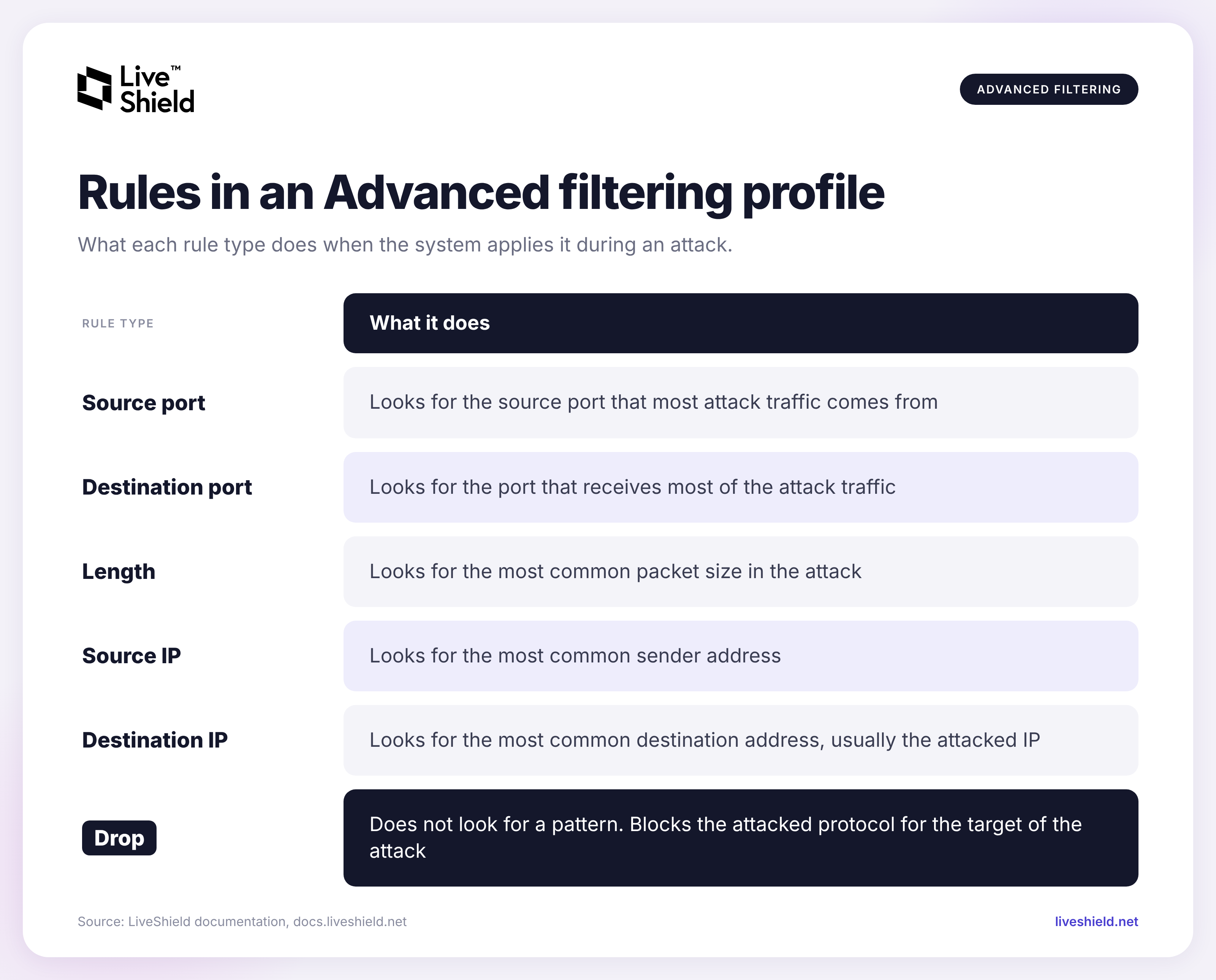
Advanced filtering is a LiveShield mechanism for attacks whose pattern cannot be described in advance. Once an attack is detected, the system observes packets and then builds filtering rules on its own, based on what it actually sees in the traffic: the source port, destination port, packet size or IP addresses. The operator does not write rules during the attack. Instead, they set up a profile in advance: the order of steps, the limits and the expiry times. A profile can also include a Drop rule, which does not look for a pattern but blocks the attacked protocol for the target of the attack.
What is an Advanced filtering profile?
A profile is a set of instructions that tells LiveShield how to examine attack traffic and which filters to build. It is created in the panel, in the Filtering section, on the Advanced filtering tab. A profile has a name and a Learning Delay parameter, which is the number of packets the system must observe before it generates the first rule. A higher value gives more accurate rules but lengthens the wait.
The actual time depends on the packet sampling rate in the Analyser. In the example from the documentation, at 128 packets per second, a delay of 500 packets means about four seconds until the first rule, and a delay of 200 packets means about two seconds. The operator therefore balances accuracy against the speed at which they want to react.
What rules does a profile contain and how do they work?
A profile consists of an ordered list of rules. Each rule has a type that defines which feature of the traffic it analyses:
For pattern rules, the operator sets four parameters:
Target Filtered - what share of the attack traffic the rule should block before the system considers the task fulfilled and moves on to monitoring only,
Max Retries - how many times the system tries to find a pattern for this rule before moving on,
Max Count - how many filtering rules a single profile rule may generate,
Timeout - how many seconds after the matching traffic stops a generated filter is removed.
Each rule can be disabled without deleting it, and the order is changed by dragging.
How does the system work through the rules of a profile?
After the learning delay has elapsed, the system processes the rules from top to bottom. At the first rule, of the Source port type, it looks for the source port from which most of the attack traffic is sent. If it does not find one, it retries up to the Max Retries limit and moves on to the next rule. If it finds one, it creates a filter for that port.
When the filter blocks the set share of traffic (Target Filtered), the rule is fulfilled and the system only observes. If it does not, the system learns further ports, up to the Max Count limit. If the rule is still not enough, the system moves on to the next one. The remaining pattern rules work the same way, each on its own traffic feature.
Two constraints apply that protect against pointless filters:
if an attack uses too many source or destination addresses, rules based on IP addresses are not created, because blocking individual addresses would achieve nothing,
a rule is applied only if it matches at least 10% of the attack traffic, so the system does not generate an avalanche of rules that each block very little.
The order of rules is therefore a sequence of attempts: from the features that most often allow selective filtering to broader ones. It is worth placing the Destination IP rule last. If all the earlier rules fail, it can block that type of traffic entirely for the attacked address.
What does the Drop rule do?
The Drop rule blocks the attacked protocol for the target of the attack. The target is the attacked IP address or, if the attack was detected at subnet level, the entire subnet. The rule does not look for a pattern and does not filter selectively: it removes all attack traffic of that protocol directed at that target.
In a profile, Drop behaves differently from pattern rules:
the Target Filtered, Max Retries and Max Count parameters do not apply to it, only Timeout matters,
while Drop is active, the rules below it in the profile are not used and no new ones are learned,
filters learned earlier for the same attack are withdrawn about five seconds after Drop starts, regardless of their own timeouts. This delay lets Drop take effect before the earlier filters disappear.
The scope of Drop is limited to the attacked protocol. This sets it apart from blackholing (RTBH), which discards all traffic directed at a given address and therefore remains the last resort in a given attack in LiveShield.
How do you assign a profile to a prefix?
A profile does nothing until it is assigned to a protocol threshold. In the Filtering section, you edit the chosen prefix and select a profile from the list at the threshold entry for the given protocol. This way, different protocols and different prefixes can have different profiles, with a different learning delay and a different rule order.
The assignment works together with the detection thresholds: it is exceeding a threshold that starts mitigation, and the profile determines how the filtering rules are built. Changes you make wait for approval by an administrator.
What does the operator set and what does the system do?
The operator sets in advance:
the profile name and the learning delay, matched to the packet sampling rate in the Analyser,
the rules: their types, limits on retries and on the number of rules, the share of traffic to block, and the timeouts,
the order of the rules, which determines the sequence of attempts,
the assignment of the profile to protocol thresholds on the chosen prefixes.
During an attack, the system observes packets, selects matching patterns, and creates or withdraws filters according to these settings. The logic is transparent and fully configurable: what gets blocked, and in what order, is decided by the profile parameters.
Why use Advanced filtering?
For many attacks, ready-made rules for the protocol and thresholds are enough. Advanced filtering complements them where the attack traffic has a common feature that is not known before the attack: a fixed source port, a repeating packet size or a narrow group of addresses. The system finds that feature during the attack and filters by it, so legitimate traffic to the same address can keep flowing.
Advanced filtering in LiveShield is an orderly process: after an attack is detected, the system waits for the set number of packets, goes through the profile rules from top to bottom and builds filters by ports, packet size or addresses. The operator controls the learning delay, the order, the limits and the timeouts. The Drop rule ends this sequence where there is no pattern: it blocks the attacked protocol for the target of the attack and withdraws earlier filters. All of it runs locally, in the operator's network, based on thresholds set for prefixes.
Related articles
Don't wait for the next DDoS attack.
Contact us today!