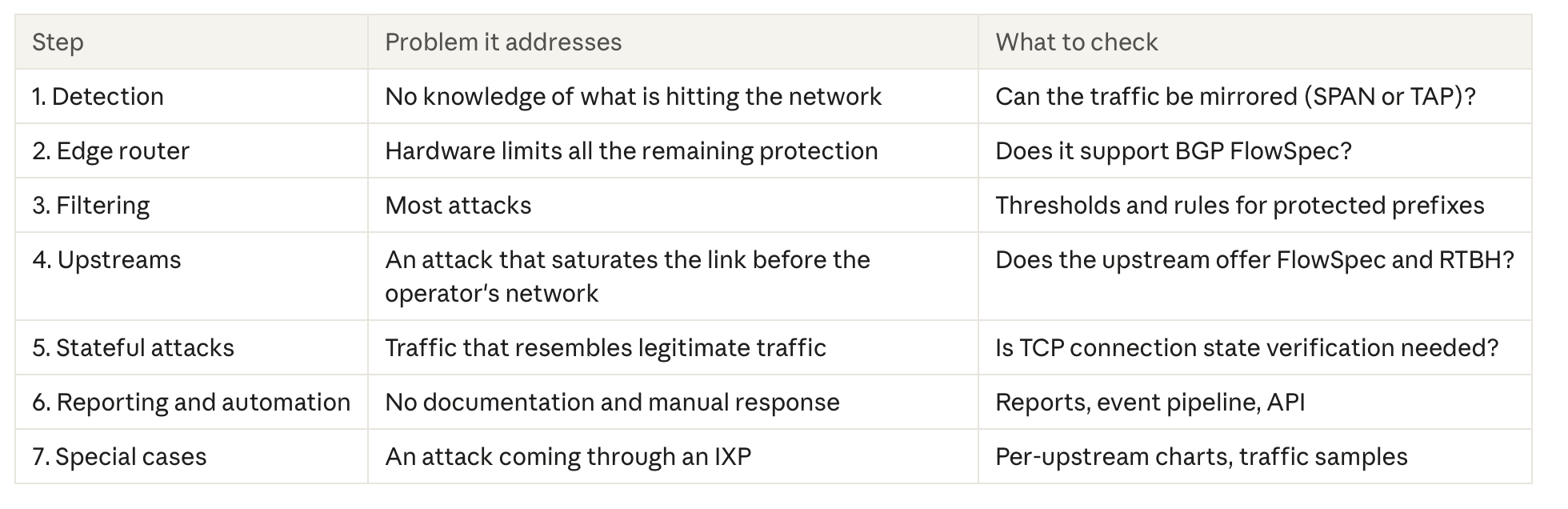
An anti-DDoS system in an operator network is not a single tool but a sequence of protection layers: from visibility of traffic in your own network, through filtering on the edge router, to cooperation with upstreams. We describe the layers in the order in which they are worth building, using the LiveShield system as an example. Each layer answers a different problem and requires a different decision from the operator.
What is the escalation ladder in DDoS protection?
The escalation ladder is the order of responses to an attack: we start with what the operator controls locally and bring in external resources only on higher steps. Higher steps rely on lower ones, so building them from the top makes no sense.
An operator should know locally what is hitting their network. The upstream does not see everything, especially when the network has several interconnections. An external scrubbing center also needs local detection, reporting and redirection to work at all.
Step 1: Why does an anti-DDoS system start with traffic visibility?
Without fast detection an attack can be neither filtered nor reported, so traffic visibility is the first and most important layer. The operator must see what is hitting their network, within seconds. Operators subject to the Polish KSC act (National Cybersecurity System) must also handle and report incidents. To do that, incidents must first be detected and documented.
This is why LiveShield does not base detection on NetFlow. NetFlow is too slow, and not all traffic reaches the analysis. The system analyses a copy of the traffic from a mirror: from a SPAN port on a router or switch, or from an optical TAP on the link. In a test, the system's reaction time to an attack was under one second.
Does traffic analysis require expensive hardware?
No. Packet processing based on DPDK bypasses the operating system kernel, so a single Dell R430-class server with a Xeon E5 v4 processor handles 40G of traffic, at a price of about PLN 2,000. Not long ago this performance required hardware many times more expensive.
Step 2: Does the edge router limit DDoS protection?
Yes. A weak edge router causes problems during attacks, because the filtering rules land on it. BGP FlowSpec support is a basic requirement here, as FlowSpec is the main mechanism the system uses to pass rules to the router.
A hardware router with an ASIC processes traffic quickly, has TCAM and a large capacity reserve. A Linux router is a last resort and makes sense only with VPP or DPDK, because the kernel is too slow for such traffic. Such a router looks cheap, but needs time-consuming tuning and offers no performance guarantee.
Mikrotik accepts FlowSpec rules but does not apply them, so with such a device only blackholing remains.
Step 3: How to filter an attack without cutting off legitimate traffic?
Effective filtering combines two mechanisms: prefiltering and advanced filtering. The result of both is BGP FlowSpec rules sent to the router, so legitimate traffic to the attacked address keeps flowing.
Prefiltering means predefined rules for the most common attack vectors, e.g. NTP, DNS or ICMP. They act immediately, without waiting for traffic learning.
Advanced filtering is dynamic traffic learning based on packet content. It is essential for botnet attacks and for traffic such as TCP or UDP that cannot simply be cut off.
Selective blackholing is the last step, not the first. It makes sense mainly for single addresses. It does not work against long carpet bombing attacks, and not every upstream accepts prefixes shorter than /32. We do not cut traffic off locally: traffic from IXPs and direct peerings stays.
For an attack spread across a whole subnet (carpet bombing), per-subnet thresholds count, not only per-IP ones. Without per-subnet thresholds such an attack will not be detected.
Step 4: What to check with upstreams before an attack?
Local filtering is not enough if an attack saturates the link before the traffic reaches the edge router. That is why choosing upstreams is a purchasing decision worth closing before the first large attack.
What to look at:
Port capacity. 10G ports are often too small today. Where possible, it is worth moving to higher-capacity ports with a lower commitment.
Traffic control. Mix-type connections make traffic control harder, because it is unclear where and how much traffic comes from.
FlowSpec at the upstream. An upstream without FlowSpec is a problem in every larger attack, especially carpet bombing. If an upstream offers FlowSpec or RTBH, rules and prefixes can be sent directly to its routers. This has to be confirmed with each provider separately.
An external scrubbing center is an optional complement. LiveShield does not have its own scrubbing center, but it can redirect traffic to one, and the redirection threshold can be tied to link saturation. The scrubbing center then complements local protection and does not replace it.
Step 5: What about attacks that look like legitimate traffic?
Such attacks require stateful traffic analysis, because a single packet does not reveal that it is part of an attack. A typical example is SYN-ACK reflection, as well as a mix of different vectors at once. Per-protocol thresholds alone cannot stop them effectively without the risk of cutting legitimate connections.
LiveShield AIF is used for such cases. It works inline, between the edge router and the BRAS or concentrator, and tracks the state of TCP connections in both directions. It is based on DPDK, so it works at high speed.
AIF does not replace link capacity. An attack that saturates the upstream link still has to be handled on higher steps: through FlowSpec or RTBH at the upstreams.
Step 6: How to document attacks and automate the response?
An operator should be able to see at any moment what the system is doing and use it in their own processes. LiveShield shows all rules active during an attack, charts broken down per upstream, and generates reports, including a KSC report. The report is used to prepare the notification, but the system does not send it automatically.
Custom event pipelines allow e-mail notifications, webhooks and scripts. A script can also change the configuration of network devices, for example stop announcing prefixes to selected upstreams, switch traffic to a scrubbing center, or keep only the upstream that supports FlowSpec.
Rules can also be created manually, independently of automatic detection, and the configuration can be changed through the public API.
Step 7: How to handle attacks coming through an IXP?
An attack coming through an IXP can be contained by tracing its source instead of cutting off the entire exchange point. This requires good per-upstream charts and traffic samples.
The procedure:
Per-upstream charts show that the traffic enters through the IXP.
From traffic samples we read the MAC address of the source.
Based on the MAC we determine the peer's IP address and its ASN.
We announce the do-not-announce community to the selected ASN, depending on the rules of the given IXP.
The traffic of this peer then no longer enters the network through the IXP, but through transit paths.
What to check in your network before an attack happens?
The quickest way to start is with questions that do not require any purchases:
Can traffic be mirrored at the network edge (SPAN or TAP)?
Does the edge router support BGP FlowSpec, and which models do we have in the network?
Does each upstream offer FlowSpec or RTBH, and on what terms?
Do we know the thresholds at which our links become saturated?
Who reacts and how when an attack hits the network outside working hours?
The answers show which step of the ladder is the weakest today. Only then is it worth planning the deployment of a system.
Related articles
Don't wait for the next DDoS attack.
Contact us today!