Your own anti-DDoS system or an upstream service? Who should detect and filter attacks in the operator's network
Your own anti-DDoS system and an upstream service do not exclude each other, because they are responsible for different things. An upstream service provides the capacity of the provider's network and acts before traffic reaches the operator's link, but it covers only the traffic that passes through that provider. Your own system sees traffic from all monitored links, decides on the response within seconds and can send rules or blackholing to the upstream. For most operators the question is therefore not "whether", but "how to divide the roles".
What do anti-DDoS services from upstreams offer?
An upstream can offer the operator one or more levels of protection: blackholing triggered by a BGP community, acceptance of BGP FlowSpec rules from the customer, a managed service with detection and filtering on the provider's side, and redirection of traffic to a scrubbing center. The scope and conditions differ between providers.
Two such services are publicly described on the Polish market, among others:
- Orange: DDoS Protection is described as continuous monitoring of the customer's traffic 24/7/365, detection of anomalies and elimination of suspicious packets, with a SOC available around the clock and a final report after the incident. Blocking takes place automatically or after consultation with the customer. The separate Orange Internet Protection service is an add-on for customers of Biznesowy VPN and Miejski Ethernet, and the customer is informed electronically about its automatic activation.
- Exatel: TAMA comes in three variants. Basic uses blackholing, Standard filters malicious traffic and lets valid traffic through, and Advanced adds SOC support during the attack. The service protects customers on Exatel's lines and runs on a central platform in its data center. Volumetric protection is described as effective up to 100 Gb/s, and the customer can set pps and bps thresholds for individual IP addresses.
Capacity is a real advantage of the provider's network. CERT Orange Polska described an attack on a single IP address with a peak of 1.5 Tb/s. That is many times the links of a typical local operator. On the public pages of both services, however, we found neither specific reaction times nor prices, so these parameters have to be obtained directly from the provider.
What does your own anti-DDoS system in the operator's network offer?
Your own system sees traffic from the perspective of the whole operator network and reacts on its routers. LiveShield analyses a copy of the traffic from a SPAN port or an optical Link TAP, outside the production path, so it covers all monitored links, not just one provider.
- Thresholds in pps and bps are set separately for individual IP addresses and for subnets, which makes it possible to detect carpet bombing as well.
- After detection, the system applies BGP FlowSpec rules matched to the characteristics of the traffic on the operator's edge routers, while blackholing remains a last resort. We describe the differences in the post on FlowSpec and RTBH.
- For stateful attacks such as SYN-ACK reflection, the inline filter LiveShield AIF is used.
- Traffic stays in the operator's network. According to the documentation it is not tunnelled out of the infrastructure, so there is no permanent added latency.
- The course of the incident is recorded, and the KSC report contains, among other things, the detection time, the time of the first rule and the time to mitigation. The system does not send notifications to the CSIRT; the user generates the report.
The license is not calculated per number of locations or devices. We describe the principles in the post One license for the whole network.
How does an upstream service differ from your own system?
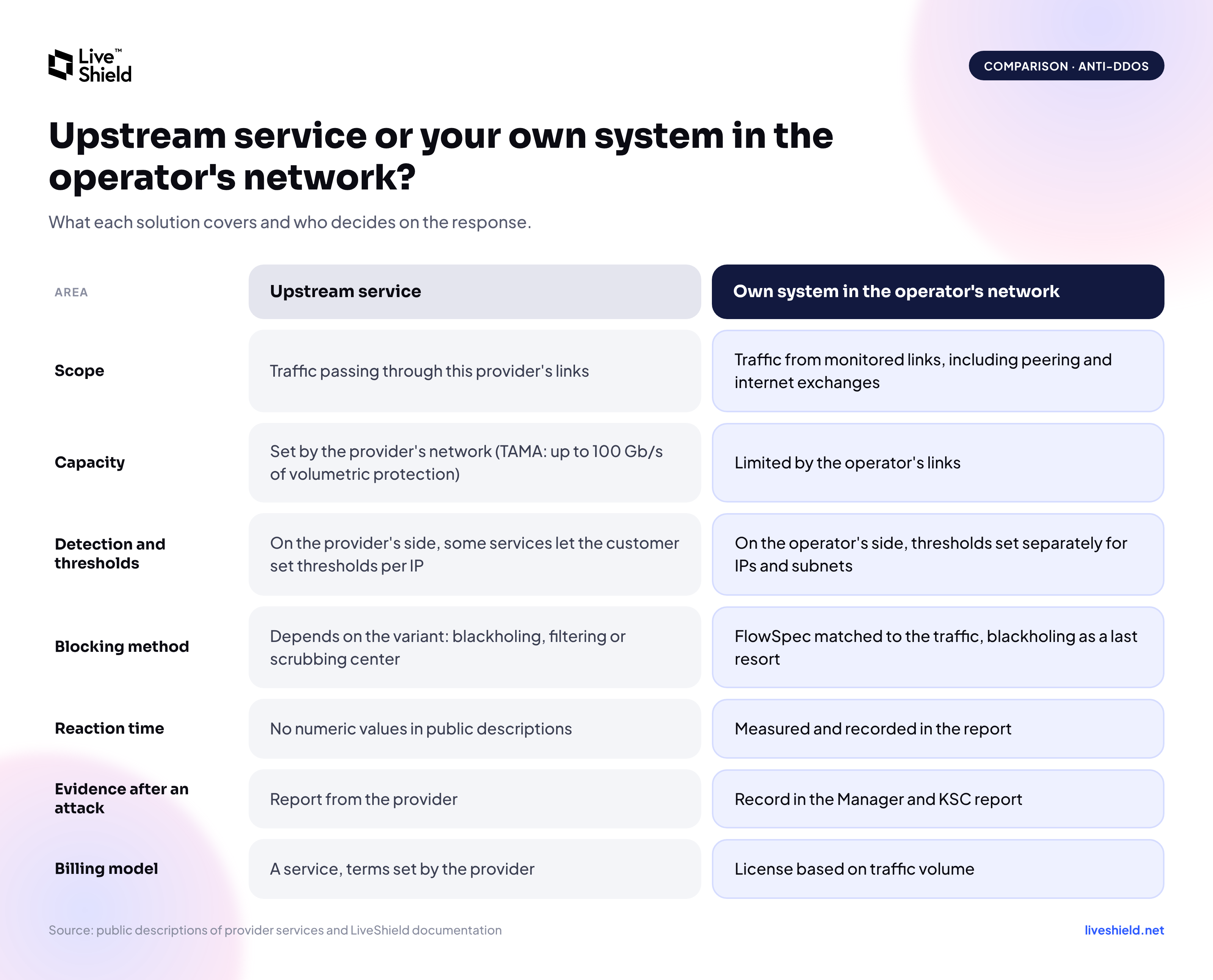
The difference concerns the scope of visibility, capacity and who makes the decision. The comparison below is based on publicly available descriptions of the services and on the LiveShield documentation.
Comparison: upstream service and your own anti-DDoS system in the operator's network. Scope, capacity, detection and thresholds, blocking method, reaction time, evidence after an attack and billing model.
Neither column wins in every row. That is why a comparison makes sense only when set against the profile of your own network.
Why is a system in the operator's network not enough against an attack larger than the link?
Filtering in the operator's network acts on traffic that has already reached it. When an attack saturates the link to the upstream, rules on the edge router will not restore bandwidth, because the packets have already used it up. We cover this case in more detail in the post on what happens when a DDoS attack exceeds the uplink bandwidth.
Then the signal has to go higher: FlowSpec rules or blackholing to the upstream, if the provider offers them, or redirection of traffic to a scrubbing center. In this role, upstream services complement local protection instead of replacing it.
How did the division of roles look in a 70 Gb/s attack on a single address?
In the first wave of the attack the local system chose the rules, and the upstreams enforced the blackholing. On 27 September 2026, in the network of a Warsaw operator protected by LiveShield, an attack began on a single IPv4 address of a subscriber. The peak reached 70.47 Gb/s and 7.15 Mpps in the third second.
- Locally, the system applied FlowSpec rules matched to the traffic: dropping UDP to port 80, small UDP datagrams and IP fragments, and in the second wave also TCP SYN and ICMP.
- At a volume above 70 Gb/s it announced blackholing of the victim address to the upstreams. It lasted 68 seconds, from 20:19:42 to 20:20:50, and was then removed automatically.
- Traffic from two transit providers fell almost to zero, while traffic from internet exchange points continued to be exchanged and was subject to the FlowSpec rules.
- The second wave, of about 52 Gb/s, did not exceed the blackholing thresholds. FlowSpec rules were enough.
The data comes from the LiveShield panel and shows traffic incoming to the network. We describe how to limit the side effects of blackholing in the post on selective blackholing.
How do you connect your own system with an upstream service?
The connection requires arrangements with each upstream separately, because the provider decides which signals it accepts. In practice it consists of several elements.
- Establish what the upstream offers. For each provider you need to confirm whether it accepts FlowSpec and RTBH and which communities or parameters are required. Some providers require a separate BGP session just for blackholing.
- A community per upstream. LiveShield announces the blackhole route with a local community, and the router rewrites it into the community required by the given provider. Each provider's requirements are configured in the Upstreams menu (blackholing documentation).
- Selective blackholing. The route goes only to upstreams that have exceeded their own thresholds. This requires tagging traffic with 802.1Q VLANs and works more slowly than ordinary blackholing, because the system tracks the traffic of each upstream separately. RTBH usually works only with IP transit providers; on private peering and at internet exchange points it is typically not supported.
- Redirection to a scrubbing center. If the operator has a contract with such a provider, the system can, after detecting an attack on a prefix, generate a FlowSpec rule with the redirect action to a given VRF or IP address. Redirection can be tied to volume thresholds, and traffic can return automatically after the attack. The router must support the redirect action, and the configuration is adapted to the operator's and the provider's network. The details are described in the post on combining local protection with a scrubbing center.
- Testing without waiting for an attack. Manual Rules let you create manual blackholing for a selected address, with a chosen community and upstreams. It is worth checking that the provider has actually accepted the /32 route and drops traffic to that address.
When is an upstream service enough, and when do you need your own system?
An upstream service can be enough as a first step when the network uses a single transit provider, has no resources to run its own system and accepts the provider's pace of reaction. Your own system is needed when the operator has its own ASN, several upstreams, peering or internet exchange points and wants to protect subscribers selectively, because the service of a single provider does not see traffic from the other directions.
In most networks with such a profile, a layered setup works best: your own system detects and filters locally, and the upstream adds capacity where local filtering is not enough.
You can see how the LiveShield panel works in the public demo at demo.liveshield.net. Technical documentation is available at docs.liveshield.net, and you can ask about deployment in your own network at [email protected].
Sources: Orange - DDoS Protection; Orange - Orange Internet Protection; Exatel - TAMA Anti-DDoS; Telepolis - record DDoS attack on the Orange Polska network; LiveShield documentation: Blackholing, FAQ.